Embeddings in Swift on Apple Silicon
Work in Progress!!
I am in process of learning the Swift programming language. I do so by following the fantastic course 100 Days of SwiftUI by Paul Hudson. It’s a fantastic course, covers basic Swift first and then SwiftUI.
When trying to apply my learning to little projects I always have lots of questions coming up, and the most reliable source to look for answers is the course, i.e. it’s pages. So I need to search in Paul Hudson’s site, more specifically in the pages of his course.
As I also play around with Machine Learning, I planned to build an App that I would call AskPaul: enter your question and get answers built by a (local!) RAG system: A system that contains all the pages of the course, in Markdown, chunked and index with it’s embeddings. Then search for the relevant chunks for the question at hand and pass it to the LLM together with the question. And when I say LLM, I mean the local LLM on your Apple device 😜
In order to experiment with the Swift Embeddings I set up a repo SwiftEmbeddings. It contains my code & Playgrounds.
What needs to be done
Here is what I want to achieve:
Given a set of web pages available as Markdown, chunk them into handy sized portions and create their embeddings: A vector (i.e. a series of 512 Double values) that represents their content in a mathematical way.
Given a question (think of something like In Swift, how can I extend a protocol?) the system should find the chunks with relevant content by calculating the embedding vector of that question and then compare it to all the chunk’s vectors to find the closest one. Those chunks are then passed to the LLM together with the question.
In the old Apple Embedding system that is located in the Natural Language framework, the functions to achieve this are easily accessible and very nicely explained in the article Finding similarities between pieces of text.
The problem
But there is a new kid on the block: NLContextualEmbedding. It was introduced in iOS 17/macOS 14 and expanded in iOS 18/macOS 15.
Here is why I want to use the new NLContextualEmbedding:
- Captures context: It would make the difference between “river bank” and “investment bank.”. The older
NLEmbeddingdidn’t make this difference. - Is multilingual and cross‑lingual: By training on multiple languages simultaneously, the model aligns semantic spaces across languages, so “chien” and “dog” are embedded nearby
- Supports more languages
- Runs entirely on device: The model respects user privacy and works offline. Only small model files are downloaded when needed, and those are cached system‑wide.
- Offers robust API controls: Developers can inspect model properties, manage assets, and integrate embeddings into their own ML pipelines.
What’s missing are
- the equivalent of
NLEmbedding‘svector(for:): Getting a vector for a sentence or a chunk - the equivalent of
distanceBetweenString:andString:distanceType:: Getting a measure for the distance between 2 sentences.
What NLContextualEmbedding provides is a function embeddingResult(for: String, language: NLLanguage?) throws -> NLContextualEmbeddingResult. But if you look into the structure of the NLContextualEmbeddingResult you see it creates a vector for every token, so a vector of vectors. Furthermore these vectors are accessed with an iterator: enumerateTokenVectors(in: Range<String.Index>, using: ([Double], Range<String.Index>) -> Bool) - which took some thinking and learning for me…
So I went out to build a simple to use tooling that is based on the new NLContextualEmbedding, similar to what we have in NLEmbedding.
Note that a crucial aspect is performance, as to find the best matching chunks / vectors in a larger set, it takes many comparisons - and my first attempts took many minutes to search…
Test Data
As I started with the idea of building an on-device RAG system for Paul Hudson’s SwiftUI course, here is what I did:
- Scrape the main pages of the SwiftUI course to Markdown
- Chunk them
- Write them all in one JSON file that I can copy in my Swift project
To get this done I plugged together some scripts in site2chunks. An example JSON is in my AskPaul project: merged_chunks
Based on this I have in my Swift code
- A
struct Chunk. If you are curious, go see the code that represents a chunk - A
Bundle Extensionthat reads the chunks from the JSON file (Code). Note: This is of course inspired from Paul Hudson’s course 😜
Note: I start with just the main pages: the entry page of each of the 100 lessons. I do this so the data set is easy to handle and my experiments are fast to run. These 100 pages are chunked into 722 chunks. Once I am done with the experiments I will increase the data set to all the pages from hackingwithswift.com .
The starting point: NLEmbedding
With this test data in place, let’s play around with the old NLEmbedding. You can look up the code in Playgrounds/01-NLEmbedding.swift
The rough structure of the code looks like this:
#Playground("Basic embedding & distance")
{
    let question = "What is a protocol?"
    let potentialAnswer = """
    A protocol defines a blueprint of methods, properties, ... blabla
    """
    guard let sentenceEmbedding = NLEmbedding.sentenceEmbedding(for: .english) else {
        fatalError("Cannot create Embedding")
    }
    guard let vector = sentenceEmbedding.vector(for: question) else {
        fatalError("Cannot create vector")
    }
    let distance = sentenceEmbedding.distance(between: question, and: potentialAnswer)
    print("Distance: \(distance.description)")
}
Here’s what this code is about:
- We initialize our variables
questionandpotentialAnswer - We create our
NLEmbeddingobject - which might (theoretically) fail. If it does, there’s nothing we can do but fail it all. - Then we calculate the distance between the question and print it.
Next, let’s see how long it takes to calculate the embedding vectors for all the 722 chunks from our test data. On my MacBook Pro it takes 35‘966 ms ~ 35 seconds or ~ 49 ms / Vector.
The other test is calculating distances between pairs of sentences:
let distance = sentenceEmbedding.distance(between: chunk1.content, and: chunk2.content)
As expected this takes about twice as long, as for every distance calculation 2 embedding vectors have to be calculated: ⏱️ [Calculating distances with NLEmbedding] count=1 total=72.558420s avg=72.558420s
Note that if I run the loop calculating the distance always to the same text, it takes almost exactly the same time as just calculating one vector. In other words this loop:
for chunk in chunks {
    let distance = sentenceEmbedding.distance(between: chunk.content, and: "This is a simple text")
}
takes about 36 seconds. This would indicate that calculating the distance between 2 vectors takes very little time…
The last thing I would like to do is to get the k closest chunks to a given question. My way of doing thins, is to sort the array of chunks by their distance to our question:
func findClosest<T: Embeddable>(to question: String, in chunks: [T], k: Int = 3) -> [T] {
        guard let sentenceEmbedding = NLEmbedding.sentenceEmbedding(for: .english) else {
            // Fallback if embedding is unavailable
            return Array(chunks.prefix(k))
        }
        let sorted = chunks.sorted { lhs, rhs in
            let dl = sentenceEmbedding.distance(between: question, and: lhs.content)
            let dr = sentenceEmbedding.distance(between: question, and: rhs.content)
            return dl < dr
        }
        return Array(sorted.prefix(k))
    }
Finding the closest chunks to a given question (which is equivalent to sorting the array) takes quite long: 1‘554‘280 ms ~ 1‘554 secs ~ 25 MINUTES
Note that we need 11‘290 comparisons. As I assume that Apple caches the Vector of the one sentence that is used in every comparison, that means that it used the time for 11‘290 x (calculate vector + calculate distance of vectors). Strange enough, this makes ~ 137ms / (calc vector + calc distance)…
An attempt to put our results in an overview:
| Data set: 722 chunks | Calc vectors | Calc distances | Sort array | ms / Vector |
|---|---|---|---|---|
| NLEmbedding | 35 sec | 70 sec | 1‘554 sec | 49 ms |
Measuring time
As we will measure lots of processing time consumed by our calculations, I built a little time tracking system. This is how to call it:
timerTrack("Timer name") {
    // Some code that I want to time here
}
timerReport("Timer name") // Prints out my timer stats
My timerTrack also returns the result of it’s block and works as async. So we can do things like this:
let result = try timerTrack("Embedding") {
    try embeddingResult(for: sentence, language: language)
}
Calculating an embedding vector based on NLContextualEmbedding the naive way
Now if we try to do a similar thing using NLContextualEmbedding, we first need to do some basic coding: Apple’s Contextual Embedding generates a list of vectors, specifically one per token.
So we need to compile them to just one vector. A standard way of achieving this is vector pooling:
Imagine you have 2 3-dimensional vectors v1 and v2, and want to calculate their mean vector v3:
v3.x = (v1.x + v2.x) / 2;
v3.y = (v1.y + v2.y) / 2;
v3.z = (v1.z + v2.z) / 2;
It would be an easy loop through the dimensions, and for every dimension calculate the average of all the components of the vectors. Now we face a little technicality: NLContextualEmbedding delivers us the vectors, wrapped in a NLContextualEmbeddingResult. If you look up the docs here is what they say:
func enumerateTokenVectors(in: Range<String.Index>, using: ([Double], Range<String.Index>) -> Bool)
# Iterates over the embedding vectors for the range you specify.
It took me some time to digest this, but this is what it boils down to:
You give it a Range<String.Index> to indicate from where to where you want the vectors listed. Why did they not simply use something like 0...10? The secret is, that the Range<String.Index> is not going through the text like T, h, ì, s, _, i, s… but through the tokens.
Let’s inspect what the tokens actually look like:
result.enumerateTokenVectors(in: result.string.startIndex..<result.string.endIndex) { vector, range in
    let token = result.string[range]
    print("Vector for token [\(token)]")
    return true // Return true to keep enumerating, false to stop early
}
This is what we get:
Vector for token []
Vector for token []
Vector for token [This]
Vector for token [is]
Vector for token [a]
Vector for token [sentenc]
Vector for token [e]
Vector for token [.]
Seeing this, it makes sense that the index is not just counting from 1 to the string.count, but is a bit of a more complex beast.
You already saw how to use the second argument of our enumerateTokenVectors function: The using-closure with a signature of ([Double], Range<String.Index>) -> Bool. That basically means you give it an array of Double (yes, this is finally our vector 😜) and a String index and return a Bool: true if you want it to continue, false if you want it to stop.
With this in mind, let’s write a function that caclculates the average of our vectors that are inside a NLContextualResult:
func meanVectorNaive(result: NLContextualEmbeddingResult) -> [Double]? {
    var sumVector: [Double]? = nil
    var count = 0
    result.enumerateTokenVectors(in: result.string.startIndex..<result.string.endIndex) { vector, _ in
        if sumVector == nil {
            sumVector = vector
        } else {
            precondition(sumVector!.count == vector.count, "All vectors must have the same length")
            for i in 0..<sumVector!.count {
                sumVector![i] += vector[i]
            }
        }
        count += 1
        return true
    }

    // Check that we are not facing an empty arry of vectors - avoid div by 0
    guard var sumVector = sumVector, count > 0 else {
        print("meanVectorNaive: No token vectors to average")
        return nil
    }

    let divisor = Double(count)
    for i in 0..<sumVector.count {
        sumVector[i] /= divisor
    }
    return sumVector
}
Here is what’s happening in the code:
- We set our
sumVectorandcount(this will be the number of vectors we added up). - Then we call the
enumerateTokenVectorswith a closure that adds the value of each vector to thesumVectorand increasecountby +1 for every vector. We start the loop with asumVectorbeingniland setting it to the value of the first vector that comes in. - Then we divide every component of the
sumVectorby the number of vectors we initially had, - …and we surround this by some guards for avoiding division by zero.
Note that in my code base I wrapped this as extensions to NLContextualEmbeddingResult.
Before we measure the timing of our naive mean pooling, let’s see how long it takes to just calculate the embedding vectors with NLContextualEmbedding:
Calculating 722 embeddings with NLContextualEmbedding (w/o compiling them to their mean) takes 5245 ms ~ 5,2 seconds.
To put it into relation, let’s add this to our overview table:
| Data set: 722 chunks | Calc’ vectors | Calc’ distances | Sort array | ms / Vector |
|---|---|---|---|---|
| NLEmbedding | 35 sec | 70 sec | 1554 sec | 49 ms |
| NLContextualEmbedding (Just the embedding) | 5 sec | 7,26 ms |
Wow! It takes 7x less time to calculate the embeddings with the more modern NLContextualEmbedding, even though this one produces not one but many vectors per chunk!
Up net, we calculate the mean vector for all of our 722 chunks: 17118 ms ~ 17 seconds
| Data set: 722 chunks | Calc’ vectors | Calc’ distances | Sort array | ms / Vector |
|---|---|---|---|---|
| NLEmbedding | 35 sec | 70 sec | 1554 sec | 49 ms |
| NLContextualEmbedding (Just the embedding) | 5 sec | 7,26 ms | ||
| NLContextualEmbedding & mean pooling naive | 17 sec | 23,71 ms |
Calculating Cosine similarity the naive way
Now if we have 2 sentences, we calculate their embedding vectors, how do we get their distance? Enters cosine similarity.
Imagine you have two arrows that start at the same point.
- Each arrow shows a direction and how long it is.
- If the arrows point in exactly the same direction, they are very similar.
- If one arrow points the opposite way, they are completely different.
- If the arrows are side by side at a right angle (like an “L”), they are not similar at all — they don’t point toward each other.
Cosine similarity is a number that tells us how much two arrows point the same way:
- If they point the same way, cosine similarity = 1 (super similar 🥰)
- If they point at 90°, cosine similarity = 0 (not similar 😐)
- If they point opposite ways, cosine similarity = -1 (totally different 😠)
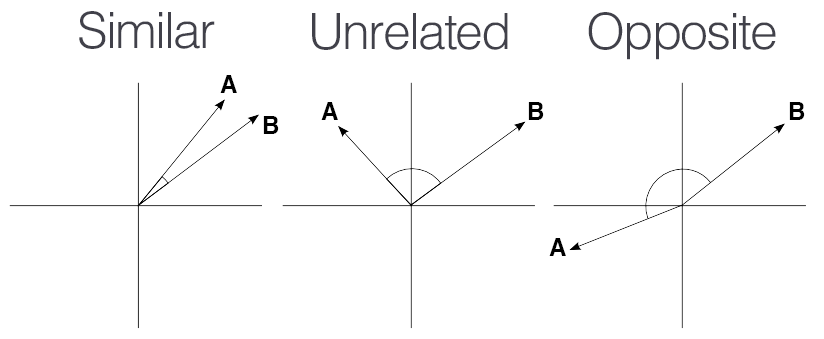
Now we rather want something that expresses a notion of distance. We call this cosine distance.
$$ \text{Cosine distance} = 1 − \text{cosine similarity} $$
That means:
- If two things are exactly the same, cosine similarity = 1 → distance = 0
- If they are completely unrelated, similarity = 0 → distance = 1
- If they are opposite, similarity = -1 → distance = 2
And now Math refresher: When we have 2 vectors, we can easily calculate their cosine.
Say you have two vectors:
- A = [a₁, a₂, …, aₙ]
- B = [b₁, b₂, …, bₙ]
The cosine similarity between them is:
$$ \text{cosine} = \frac{A \cdot B}{|A| \times |B|} $$
- where $A \cdot B$ is the dot product $A \cdot B = a₁b₁ + a₂b₂ + … + aₙbₙ$
- and the magnitude is $||A|| = \sqrt{a₁² + a₂² + … + aₙ²}$
Putting this into code the naive way:
func cosineSimilarityNaive(_ a: [Double], _ b: [Double]) -> Double? {
    guard a.count == b.count, !a.isEmpty, !b.isEmpty else {
        return nil // vectors must have same size and not be empty
    }
    let dotproduct = 0.0
    var firstSquared = 0.0
    var secondSquared = 0.0
    for i in 0..<a.count {
        dotproduct += a[i] * b[i]
        firstSquared += a[i] * a[i]
        secondSquared += b[i] * b[i]
    }
    let normA = sqrt(firstSquared)
    let normB = sqrt(secondSquared)

    guard normA > 0 && normB > 0 else {
        return nil
    }
    return dotproduct / (normA * normB)
}
Now with this in place we can calculate the 722 distance with our naive implementation: This takes us 34306 ms ~ 34 sec
Now we sort our array by using this distance function: this takes us 717983 ms ~ 717 sec ~ 12 minutes. Still twice as fast as the old NLEmbedding - and we haven’t started tuning yet! 😜
| Data set: 722 chunks | Calc’ vectors | Calc’ distances | Sort array | ms / Vector |
|---|---|---|---|---|
| NLEmbedding | 35 sec | 70 sec | 1554 sec | 49 ms |
| NLContextualEmbedding (Just the embedding) | 5 sec | 7,26 ms | ||
| NLContextualEmbedding & mean pooling naive | 17 sec | 34 sec | 717 sec ~ 12 min | 23,71 ms |
Now let’s look into some optimization…
Reducing embedding vector calculations
The first thing that jumps into our face is that in our code we calculate the same vectors over and over. We had to do this using NLEmbedding, because it was all packaged and provided by Apple - we probably also benefitted from their internal tuning. Now that we built out our own tooling, we are open to optimize this.
You maybe noticed that we packaged our content string in Chunk structs, and those structs conform to the Embeddable protocol. This protocol gives us a standard way of accessing the string that should be embedded via the variable content:
protocol Embeddable: Identifiable {
    var content: String { get }
}
You might notice it also extends the Identifiable protocol, and that’s what I will use here: I will build an EmbeddingStore that remembers the embedding to a chunk by using the chunk’s id:
actor EmbeddingStore {
        init(model: NLContextualEmbedding) {...}
        func loadChunks(_ newChunks: [Chunk]) async {...}
}
What it basically does is calculating the embedding vectors for chunks and then using them to get a distance and to sort them all. The only tricky part is the async side: using NLContextualEmbedding is async, so we do it all at the beginning and then use the pre-calculated vectors when sorting - w/o any async burden by that time. We also shift the work around actors a bit… The benefit is impressive:
| Data set: 722 chunks | Calc’ vectors | Calc’ distances | Sort array | ms / Vector |
|---|---|---|---|---|
| NLEmbedding | 35 sec | 70 sec | 1554 sec | 49 ms |
| NLContextualEmbedding (Just the embedding) | 5 sec | 7,26 ms | ||
| NLContextualEmbedding & mean pooling naive | 17 sec | 34 sec | 717 sec | 23,71 ms |
| NLContextualEmbedding & mean pooling naive w/ cached distances | 17 sec | 74 ms ~ 0,074 sec | 1 ms | 23,71 ms |
That basically means that calculating the cosine similarity by multiplying vectors is super cheap, even the naive way. And sorting them once the distances have been calculated is almost free 😜
I had in mind some other tuning measures that I will postpone, as the cosine calculation is so cheap. Here is what I thought of initially:
Tuning by using Matrix calculation: Apple offers the Accelerate Framework that provides very fast vector and matrix operations. In our case we could improve the cosine similarity calculations. Based on Apple’s explanations I would expect that we could make it ~3x faster.
Tuning by using normed vectors: Currently we calculate the cosine similarity like this:
$$ \text{cosine} = \frac{A \cdot B}{|A| \times |B|} $$
If we would use normed vectors of length 1, we could avoid the division by the product of their length and would end up with
$$ \text{cosine} = {A \cdot B} $$
Maybe we will revisit once we have larger data sets.
Extending the data set
Now that the experiment runs within reasonable time with the test data set, let’s expand it to our real data set. If we scrape the site www.hackingwithswift.com more extensively and chunk the markdown files we get, we end up with 21‘730 chunks. Let’s play around with this data set and run our last process: Loud them in our EmbeddingStore, which basically means we calculate their vectors by running NLContextualEmbedding.embeddingResult and then calculate the mean vector - still in our naive way. And then we calculate the distance of every of our vectors to the vector of our question and we sort by this distance. Here are the results:
| Data set: 21‘730 chunks | |
|---|---|
| Calculating vectors | 487,967 sec ~ 8 min |
| Calculating distances | 2,165 sec |
| Sorting based on distances | 49 ms |
Pay attention to the units when reading this table! 😜
8 minutes to calculate the vectors of our 21’ chunks. These are the actions that come to mind:
- How much of this time is used to create the Embedding vectors? And how much is compiling these vectors to one with our mean vector calculation?
- Since these vectors stay the same for our data set (unless we change the Embedding Model), we should definitely save them.
So if we look into the NLContextualEmbedding.vectorNaive function, we see the following time consumptions:
⏱️ [Embedding] count=21730  total=158.623341s  avg=7.300ms
⏱️ [MeanVector] count=21730  total=329.307913s  avg=15.155ms
As we can’t speed up the Embedding creation (if you have an idea, drop me an email!), let’s look at the mean vector calculation: As we described earlier it basically sums up a list of vectors and then divides it by the no of vectors so it get’s the average. Time to unpack the Accelerate Framework!
Using Accelerate Framework
The part of the Accelerate Framework that we are going to use is vDSP. It’s subtitled Perform basic arithmetic operations and common digital signal processing (DSP) routines on large vectors., but it contains exactly what we need.
The function we’ll use is vDSP.add(a, b): Returns the double-precision element-wise sum of two vectors.
So we clculte our mean vector by cycling thru the vectors of the EmbeddingResult and summing them up:
sumVector = vDSP.add(sumVector!, vector)
Using this fast vector addition, this is our timing we get:
| Data set: 21‘730 | Calc Embed’s | Calc Mean | Sorting | Total |
|---|---|---|---|---|
| Naive w/ caching | 158 sec | 329 sec ~ 5,48 min | 49 ms | 487 sec ~ 8,1 min |
| Using vDSP | 157 sec | 159 sec ~ 2,6 min | 49 ms | 316 sec ~ 5,2 min |
So we brought it down by 3 minutes 😜
Up next
The next steps towards a functioning AskPaul application that I have in mind are
- Think of how to evaluate the quality of the search, that will most certainly include
- Collecting questions and the relevant places in hackingwithswift that answer that question
- Automate asking the questions and evaluating the returned chunks
- Tune whatever it takes: How we chunk, how big the chunks are, how we search…
- Wrap the vector calculation and search function in a library. Maybe even together with the testing & tuning part.
- Integrate the chunking & searching into a RAG system
- Build the application for Paul 😜
Todo
- Modify timing to run the experiments around 100x and calc average in order to get reliable data
- Run experiments on physical devices.